
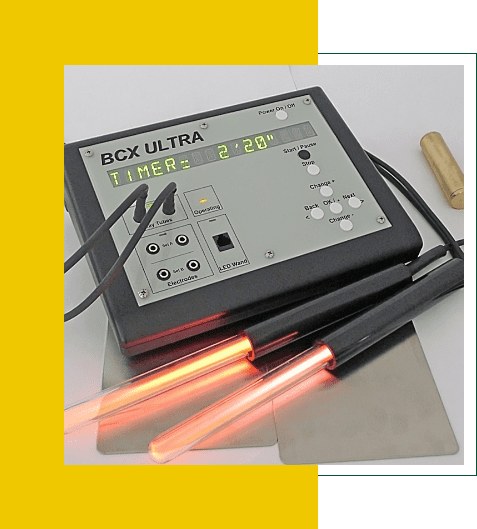
BCX Ultra Menu Upgrade
Item UG-BCXUltra2
Menu Feature Program Upgrade
Price Including Free Standard Shipping: $360
Upgrades older BCX Ultra with Chain, Sweep, and New Menu Features This Upgrade is for BCX Ultra's Serial Number AA11011 to AA11582
|
|
How long will the upgrade take?
It normally takes a few days for repairs. We often run the unit for a day or two after the repair to assure that all is OK. Return time by USPS is usually 3-4 working days.
What to send
Put a note in the box with your name, email address, telephone number.
You do not have to send accessories such as power supplies, electrode wires, and raytubes
How to pack it
Pack a BCX Ultra in a USPS Medium Flat Rate Box-1 OFRB1I (11' x 9' x 6'). Use a little padding, such as small bubble wrap, foam, or crumpled paper towels, on the bottom and sides. Fill the box above the unit with the same type of padding.
DO NOT SEND BLACK CARRYING CASES. They do not fit in the boxes we use to return your items. If we receive
a black carrying case and you wish to have it returned, there will be additional shipping charges.
How to ship it
Ship by USPS Priority Mail. Tracking is provided by the Post Office. Keep your tracking number, and you can check for delivery status at www.USPS.com. Insurance is your option. We have never experienced a lost item and never had a unit damaged in shipping when packaged this way.
Where to ship by USPS
DCI Technology, LLC.
P.O. Box 972
Kilauea, HI 96754
International, FedEx, UPS, DHL, or unusual shipping needs:
Contact us at repair@dcispec.com or (808) 639-7944
BCX Ultra Menu Upgrade Additional Information
ADDED FUNCTIONS:
* Chaining of up to 100 programs:
Automatic execution of programs one after another, or indefinite repeat
* Sweep of carrier and/or frequency:
Automatic dwell and incremental frequency change with programmable time and order
* New Menu structure with additional operating features:
RUN PRESTRD PROG
Choose and run any of 1,236 Pre-stored programs. Pre-stored programs are Sequences of a series of frequencies, or a Single frequency in the series.
RUN CUSTOM PROG.-
Choose and run any of 255 custom programs. Custom programs are sequences, sweeps, and chains. Custom programs can be edited, saved, and erased.
CREATE/EDIT PROG.-
Choose an existing custom program to edit it, or an empty custom program to create a new one. Custom program types are:
SEQUENCE- A series of frequencies one after another
SWEEP (name prefix- SW.)- Automatic stepping of frequencies between ranges
CHAIN (name prefix- CH.)- Chain up to 100 custom programs (any type)
VIEW PROGRAM- Choose and view any program.
COPY PROGRAM- Copy any program to a Custom program.
ERASE PROGRAM- Choose and Erase any Custom program.
CHANGE DEFAULTS- Change running and operational defaults.
COMPUTER- Factory computer access shows the software revision number.
INSTRUCTIONS- Displays operational instructions.
Chain Programs are sequentially run Programs. They may be Prestored, Sequence, Sweep, or other Chain Programs
INSTRUCTIONS:
1. Select an Empty Program from “Create/Edit Program”
2. Press “Change” to select a Chain Program
3. Press “Change” to select Prestored or Custom Program
4. Select a Prestored or Custom program
5. Add up to 100 programs
Continuous operation of a program can be accomplished by creating a chain program with the program to be
repeated in it. Then, edit the chain program, adding the chain program itself at the end. The program will repeat
over and over until manually stopped.